






 Owned answers and AI visibility
A public answer for every known issue
Logitech came to Bettermode with a support problem. Repetitive questions swamped the support team. Product information and troubleshooting guides were spread across several platforms, and customers struggled to find answers fast. So Logitech moved its knowledge base onto Bettermode, into one searchable place.
The Known Issues space shows how far that goes. Each entry lists the products affected, the conditions, any workaround and the resolution progress, with an issue number and a status. IT teams can filter by product, service provider and status, or subscribe to the list by RSS.
All of it is open. Anyone can read the hub without an account and search engines are allowed to crawl it. It comes in 10 languages, with AI-translated content labeled as such. That’s the kind of page search engines and AI assistants can read and point to when someone asks about a Logitech device.
-
Known issues, in public
Affected products, conditions, workarounds and progress for each issue, filterable and on RSS.
-
Articles and guides
Product documentation and troubleshooting, open around the clock.
-
10 language versions
English, Japanese, Chinese, French, German, Italian, Spanish, Dutch, Portuguese and Korean.
-
Open to search
No login to read, and nothing blocks search engines from crawling the hub.
 Retention and expansion
Help for every device an IT team runs
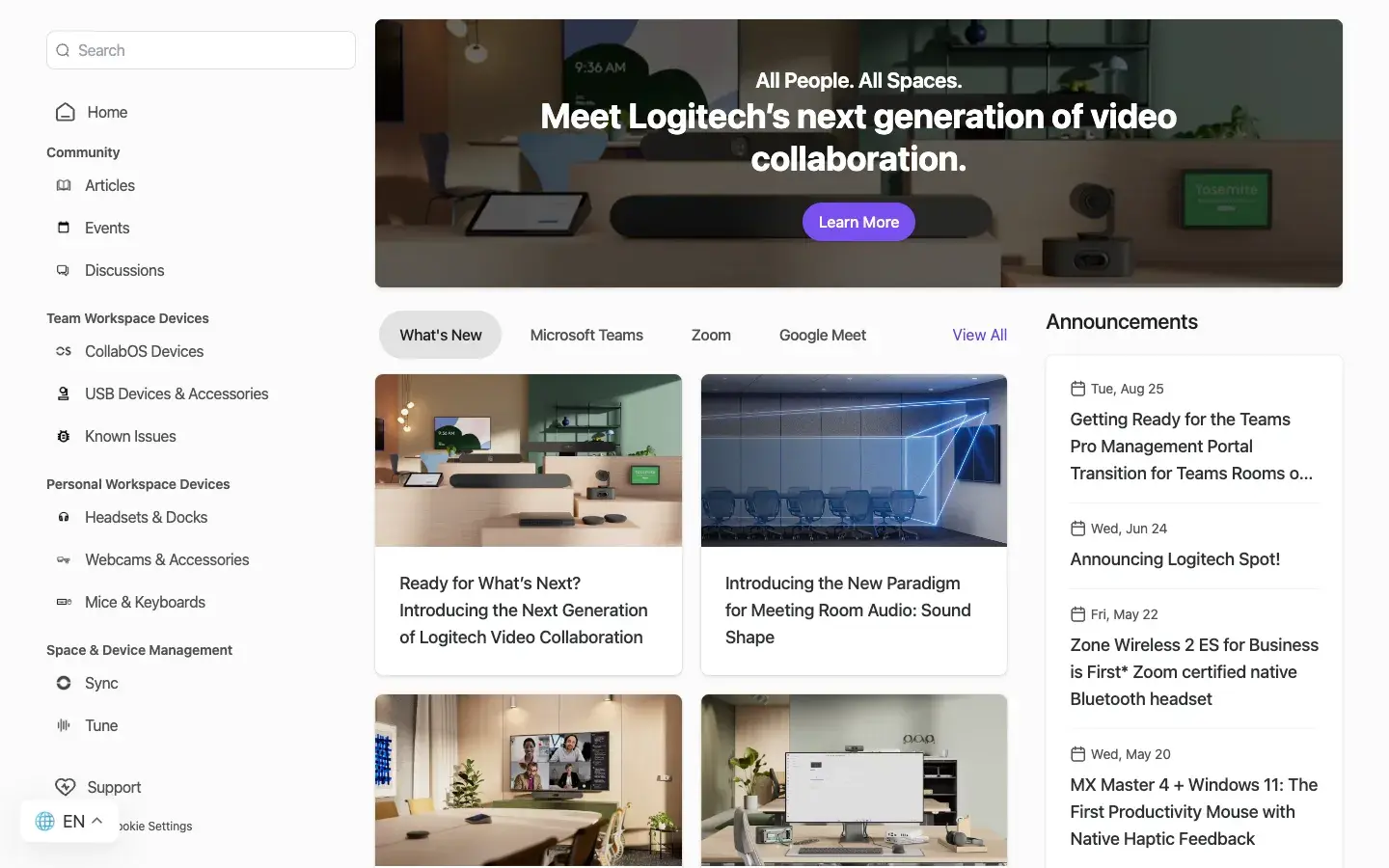
The hub is laid out the way an IT team thinks about what it manages. Team workspace devices cover CollabOS room systems and USB devices and accessories. Personal workspace devices cover headsets and docks, webcams, mice and keyboards. Space and device management covers Sync and Tune. There’s also a Support space and an open Discussions space.
Logitech’s story credits the knowledge base with cutting support ticket volume. Customers reach documentation and fixes at any hour, and the support team spends its time on the complex issues instead of the routine ones.
 Product launches
What’s new, from Logitech Spot to end-of-sale notices
The home page leads with What’s New, filterable by Microsoft Teams, Zoom and Google Meet, with an Announcements column beside it. Entries cover the next generation of Logitech video collaboration, Sound Shape for meeting room audio, next-gen Teams Rooms solutions and the launch of Logitech Spot.
The less exciting news goes to the same place, which is exactly where an IT team needs it: an end-of-sale notice for Logi Dock Flex, and a guide to getting ready for the Teams Pro Management Portal transition on Teams Rooms on Android.
 Events that keep working
Logi Work events, in person and online
The Events space lists what’s coming worldwide, with filters for global virtual events and for North America, Latin America, Europe and Asia Pacific. The list has carried Logi Work events in Milan, Warsaw, Toronto and Berlin, a Talk Techie to Me session on the Rally Bar 2, a New&Now webinar with Google Meet and a Logitech Lounge at Microsoft Ignite. Past events and videos sit one tab over, so a session keeps its home after the day it runs.